# 气泡确认框
- 页面: https://jiguang132.com/zh/resources/ant-design/docs/popconfirm
- 资源: Ant Design (https://jiguang132.com/zh/resources/ant-design.md)
- 全部指南: https://jiguang132.com/zh/resources/ant-design/docs.md
点击元素,弹出气泡式的确认框。
## 何时使用 {#when-to-use}
目标元素的操作需要用户进一步的确认时,在目标元素附近弹出浮层提示,询问用户。
和 `confirm` 弹出的全屏居中模态对话框相比,交互形式更轻量。
## 代码演示 {#examples}
- 基本 · `basic`
- 国际化 · `locale`
- 位置 · `placement`
- 贴边偏移 · `shift`
- 条件触发 · `dynamic-trigger`
- 自定义 Icon 图标 · `icon`
- 异步关闭 · `async`
- 基于 Promise 的异步关闭 · `promise`
- 自定义语义结构的样式和类 · `style-class`
## API
通用属性参考:[通用属性](#jguang-common-props)
| 参数 | 说明 | 类型 | 默认值 | 版本 | [全局配置](/components/config-provider#component-config) |
| --- | --- | --- | --- | --- | --- |
| cancelButtonProps | cancel 按钮 props | [ButtonProps](/components/button#api) | - | | × |
| cancelText | 取消按钮文字 | string | `取消` | | × |
| disabled | 阻止点击 Popconfirm 子元素时弹出确认框 | boolean | false | | × |
| icon | 自定义弹出气泡 Icon 图标 | ReactNode | <ExclamationCircleFilled /> | | × |
| okButtonProps | ok 按钮 props | [ButtonProps](/components/button#api) | - | | × |
| okText | 确认按钮文字 | string | `确定` | | × |
| okType | 确认按钮类型 | string | `primary` | | × |
| showCancel | 是否显示取消按钮 | boolean | true | 4.18.0 | × |
| title | 确认框标题 | ReactNode \| () => ReactNode | - | | × |
| description | 确认内容的详细描述 | ReactNode \| () => ReactNode | - | 5.1.0 | × |
| onCancel | 点击取消的回调 | function(e) | - | | × |
| onConfirm | 点击确认的回调 | function(e) | - | | × |
| onPopupClick | 弹出气泡点击事件 | function(e) | - | 5.5.0 | × |
| 参数 | 说明 | 类型 | 默认值 | 版本 | [全局配置](/components/config-provider#component-config) |
| --- | --- | --- | --- | --- | --- |
| align | 请参考 [dom-align](https://github.com/yiminghe/dom-align) 进行配置 | object | - | | × |
| arrow | 修改箭头的显示状态以及修改箭头是否指向目标元素中心 | boolean \| { pointAtCenter: boolean } | true | 5.2.0 | Tooltip: 6.0.0,Popover: 6.0.0,Popconfirm: 6.0.0 |
| autoAdjustOverflow | 气泡被遮挡时自动调整位置 | boolean | true | | × |
| color | 背景颜色 | string | - | 4.3.0 | × |
| classNames | 用于自定义组件内部各语义化结构的 class,支持对象或函数 | Record<[SemanticDOM](#semantic-dom), string> \| (info: { props }) => Record<[SemanticDOM](#semantic-dom), string> | - | 5.23.0 | Tooltip: 5.23.0,Popover: 5.23.0,Popconfirm: 5.23.0 |
| defaultOpen | 默认是否显隐 | boolean | false | 4.23.0 | × |
| ~~destroyTooltipOnHide~~ | 关闭后是否销毁 dom | boolean | false | | × |
| destroyOnHidden | 关闭后是否销毁 dom | boolean | false | 5.25.0 | × |
| fresh | 默认情况下,Tooltip 在关闭时会缓存内容。设置该属性后会始终保持更新 | boolean | false | 5.10.0 | × |
| getPopupContainer | 浮层渲染父节点,默认渲染到 body 上 | (triggerNode: HTMLElement) => HTMLElement | () => document.body | | × |
| mouseEnterDelay | 鼠标移入后延时多少才显示 Tooltip,单位:秒 | number | 0.1 | | Tooltip: 6.6.0,Popover: 6.6.0,Popconfirm: 6.6.0 |
| mouseLeaveDelay | 鼠标移出后延时多少才隐藏 Tooltip,单位:秒 | number | 0.1 | | Tooltip: 6.6.0,Popover: 6.6.0,Popconfirm: 6.6.0 |
| ~~overlayClassName~~ | 卡片类名, 请使用 `classNames.root` 替换 | string | - | | × |
| ~~overlayStyle~~ | 卡片样式, 请使用 `styles.root` 替换| React.CSSProperties | - | | × |
| ~~overlayInnerStyle~~ | 卡片内容区域的样式对象, 请使用 `styles.container` 替换 | React.CSSProperties | - | | × |
| placement | 气泡框位置,可选 `top` `left` `right` `bottom` `topLeft` `topRight` `bottomLeft` `bottomRight` `leftTop` `leftBottom` `rightTop` `rightBottom` | string | `top` | | × |
| styles | 用于自定义组件内部各语义化结构的行内 style,支持对象或函数 | Record<[SemanticDOM](#semantic-dom), CSSProperties> \| (info: { props }) => Record<[SemanticDOM](#semantic-dom), CSSProperties> | - | 5.23.0 | Tooltip: 5.23.0,Popover: 5.23.0,Popconfirm: 5.23.0 |
| trigger | 触发行为,可选 `hover` \| `focus` \| `click` \| `contextMenu`,可使用数组设置多个触发行为 | string \| string\[] | `hover` | | Tooltip: 6.1.0,Popover: 6.1.0,Popconfirm: 6.1.0 |
| open | 用于手动控制浮层显隐,小于 4.23.0 使用 `visible`([为什么?](/docs/react/faq#弹层类组件为什么要统一至-open-属性)) | boolean | false | 4.23.0 | × |
| zIndex | 设置 Tooltip 的 `z-index` | number | - | | × |
| onOpenChange | 显示隐藏的回调 | (open: boolean) => void | - | 4.23.0 | × |
## Semantic DOM
| 语义节点 | 原生说明 | 版本 |
| --- | --- | --- |
| `root` | 根元素,设置绝对定位、层级、变换原点、箭头指向和弹层容器样式 | — |
| `container` | 容器元素,设置背景色、内边距、圆角、阴影、边框和内容展示样式 | — |
| `icon` | 图标元素,设置确认图标的尺寸、颜色和布局样式 | 6.4.0 |
| `title` | 标题元素,设置标题文本样式和间距 | — |
| `content` | 描述元素,设置描述文本样式和布局 | — |
| `arrow` | 箭头元素,设置宽高、位置、颜色和边框样式 | — |
语义说明来源: `vendor/components/popconfirm/demo/_semantic.tsx`
## 主题变量(Design Token){#design-token}
类型、继承关系和原生令牌声明保持固定源码原文;默认值由原生主题计算,并可能受 ConfigProvider 覆盖。本表不伪造静态默认值。
| 令牌 | 类型 | 原生说明 |
| --- | --- | --- |
| `zIndexPopup` | `number` | 确认框 z-index |
声明来源: `vendor/components/popconfirm/style/index.ts`
```ts
import type { CSSObject } from '@ant-design/cssinjs';
import type { FullToken, GenerateStyle, GetDefaultToken } from '../../theme/internal';
import { genStyleHooks } from '../../theme/internal';
export interface ComponentToken {
/**
* @desc 确认框 z-index
* @descEN z-index of Popconfirm
*/
zIndexPopup: number;
}
/**
* @desc Popconfirm 组件的 Token
* @descEN Token for Popconfirm component
*/
export interface PopconfirmToken extends FullToken<'Popconfirm'> {}
```
## FAQ
### 为何在严格模式中有时候会出现 `findDOMNode is deprecated` 这个警告?
这是由于 `@rc-component/trigger` 的实现方式导致的,`@rc-component/trigger` 强制要求 children 能够接受 ref,否则就会 fallback 到 findDOMNode,所以 children 需要是原生 html 标签,如果不是,则需要使用 `React.forwardRef` 把 `ref` 透传到原生 html 标签。
- `findDOMNode is deprecated` 重现:
- 使用 `forwardRef` 消除警告:
### 为什么自定义子组件无法正常工作?
类似问题: [#15909](https://github.com/ant-design/ant-design/issues/15909), [#12812](https://github.com/ant-design/ant-design/issues/12812)。
请确保子元素能接受 `onMouseEnter`、`onMouseLeave`、`onPointerEnter`、`onPointerLeave`、`onFocus`、`onClick` 事件。[参考示例](http://ant.design/components/tooltip-cn#tooltip-demo-wrap-custom-component)
### placement 的行为逻辑是什么?
当屏幕空间足够时,会按照 `placement` 的设置进行弹层。当空间不足时则会取反向位置进行弹层(例如 `top` 不够时,会改为 `bottom`,`topLeft` 不够时会改为 `bottomLeft`)。单一方向如 `top` `bottom` `left` `right` 当贴边时进行自动位移:
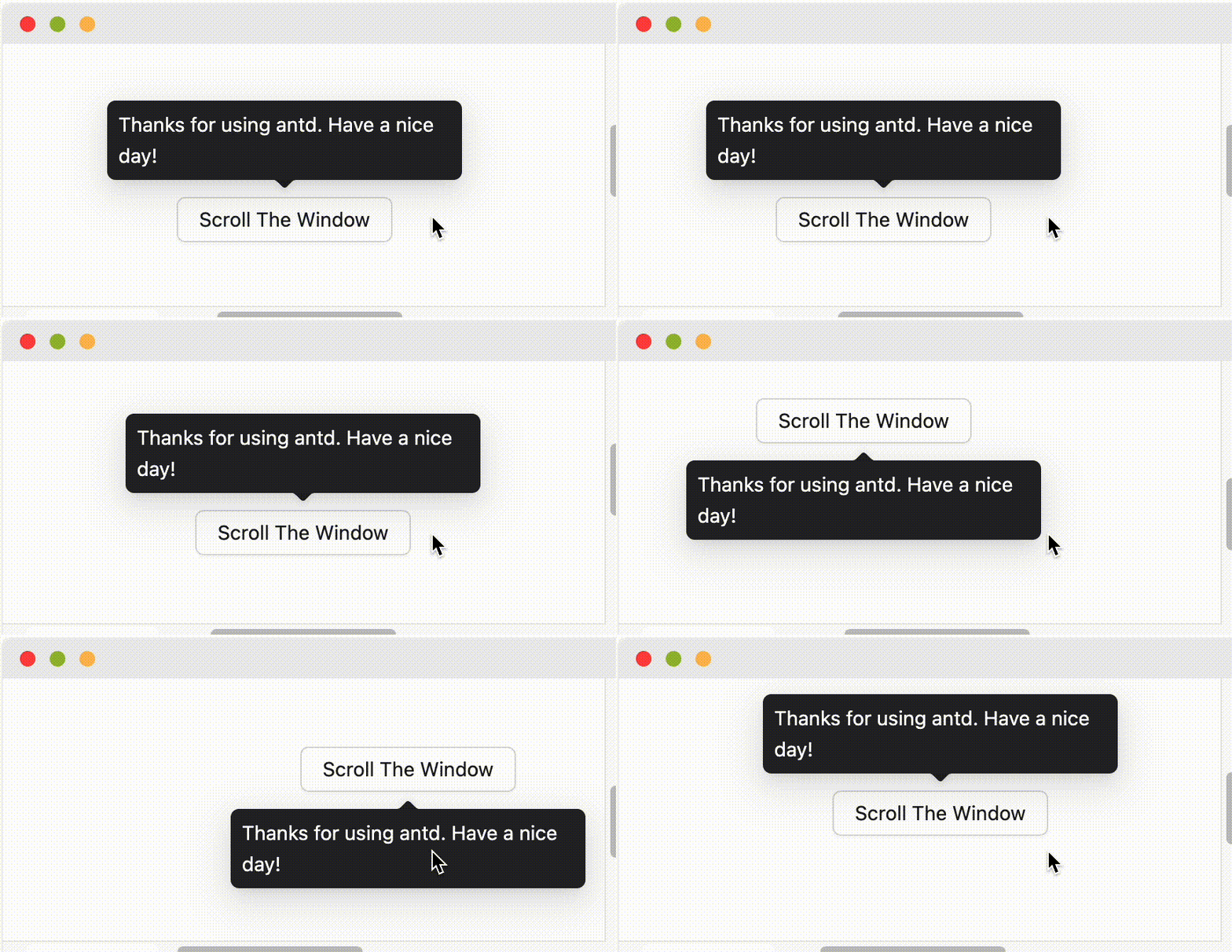 当设置为边缘对齐方向如 `topLeft` `bottomRight` 等,则会仅做翻转而不做位移。
### 如何支持键盘无障碍访问?
Tooltip 等组件的默认触发方式(`trigger`)为 `hover`,不包含 `focus`,因此无法响应键盘聚焦事件。如果你希望组件支持键盘操作,可以通过以下方式开启:
- **单个组件开启**:将 `trigger` 属性设置为包含 `focus` 的值,例如 `trigger="focus"` 或 `trigger={['hover', 'focus']}`。
- **全局开启**:通过 `ConfigProvider` 进行全局配置,这样应用内的所有相关组件都会默认支持键盘聚焦触发。
```jsx
import { ConfigProvider, Tooltip, Button } from 'antd';
// 单个组件
// 全局配置
```
更多问题,请参考 [Tooltip FAQ](/components/tooltip#faq)。
## 原生通用属性 {#jguang-common-props}
> Tips: 以下通用属性适用于 antd 大部分组件,不支持的组件会单独说明。
| 参数 | 说明 | 类型 | 默认值 |
| --- | --- | --- | --- |
| style | 自定义样式 | CSSProperties | - |
| className | 自定义类名 | string | - |
| rootClassName | 添加在组件最外层的 className | string | - |
| autoFocus | 自动获取焦点,仅对表单类、链接、交互容器等可聚焦元素生效 | boolean | false |
## 安装并复现示例
```bash
npm install antd@6.6.5 @ant-design/icons@6.3.4 dayjs@1.11.23
```
使用 ConfigProvider 和原生 App,并单独配置 dayjs 语言。每个示例在查看代码中列出完整源码文件和额外固定依赖。示例名称用于选择演示,不是组件通用属性。主题、语言与 SSR 初始化见资源安装指南。
## 原生类型参考
源码查看器包含未修改的原生实现和以下声明文件,继承类型仍位于原生包中。代码中的英文注释保留为源码参考。
- `vendor/components/popconfirm/PurePanel.tsx`
- `vendor/components/popconfirm/index.tsx`
- `vendor/components/popconfirm/style/index.ts`
## 来源与许可
https://github.com/ant-design/ant-design/tree/4a39f54842eade4e565ab336ef6097cd7e723cdd
保留原生中英文正文与可执行示例;官网专用的嵌入章节和令牌表格在本地展开。Ant Design 使用 MIT 许可,另列依赖的许可证也需保留。上传预览禁止向外发起请求,不提供后端服务。
---
JGuang 全部资源索引: https://jiguang132.com/llms.txt
当设置为边缘对齐方向如 `topLeft` `bottomRight` 等,则会仅做翻转而不做位移。
### 如何支持键盘无障碍访问?
Tooltip 等组件的默认触发方式(`trigger`)为 `hover`,不包含 `focus`,因此无法响应键盘聚焦事件。如果你希望组件支持键盘操作,可以通过以下方式开启:
- **单个组件开启**:将 `trigger` 属性设置为包含 `focus` 的值,例如 `trigger="focus"` 或 `trigger={['hover', 'focus']}`。
- **全局开启**:通过 `ConfigProvider` 进行全局配置,这样应用内的所有相关组件都会默认支持键盘聚焦触发。
```jsx
import { ConfigProvider, Tooltip, Button } from 'antd';
// 单个组件
// 全局配置
```
更多问题,请参考 [Tooltip FAQ](/components/tooltip#faq)。
## 原生通用属性 {#jguang-common-props}
> Tips: 以下通用属性适用于 antd 大部分组件,不支持的组件会单独说明。
| 参数 | 说明 | 类型 | 默认值 |
| --- | --- | --- | --- |
| style | 自定义样式 | CSSProperties | - |
| className | 自定义类名 | string | - |
| rootClassName | 添加在组件最外层的 className | string | - |
| autoFocus | 自动获取焦点,仅对表单类、链接、交互容器等可聚焦元素生效 | boolean | false |
## 安装并复现示例
```bash
npm install antd@6.6.5 @ant-design/icons@6.3.4 dayjs@1.11.23
```
使用 ConfigProvider 和原生 App,并单独配置 dayjs 语言。每个示例在查看代码中列出完整源码文件和额外固定依赖。示例名称用于选择演示,不是组件通用属性。主题、语言与 SSR 初始化见资源安装指南。
## 原生类型参考
源码查看器包含未修改的原生实现和以下声明文件,继承类型仍位于原生包中。代码中的英文注释保留为源码参考。
- `vendor/components/popconfirm/PurePanel.tsx`
- `vendor/components/popconfirm/index.tsx`
- `vendor/components/popconfirm/style/index.ts`
## 来源与许可
https://github.com/ant-design/ant-design/tree/4a39f54842eade4e565ab336ef6097cd7e723cdd
保留原生中英文正文与可执行示例;官网专用的嵌入章节和令牌表格在本地展开。Ant Design 使用 MIT 许可,另列依赖的许可证也需保留。上传预览禁止向外发起请求,不提供后端服务。
---
JGuang 全部资源索引: https://jiguang132.com/llms.txt