# Popover
- Page: https://jiguang132.com/resources/ant-design/docs/popover
- Resource: Ant Design (https://jiguang132.com/resources/ant-design.md)
- All guides: https://jiguang132.com/resources/ant-design/docs.md
The floating card pops up when clicking/mouse hovering over an element.
## When To Use
A simple popup menu to provide extra information or operations.
Comparing with `Tooltip`, besides information `Popover` card can also provide action elements like links and buttons.
## Examples
- Basic · `basic`
- Three ways to trigger · `triggerType`
- Placement · `placement`
- Arrow · `arrow`
- Auto Shift · `shift`
- Controlling the close of the dialog · `control`
- Hover with click popover · `hover-with-click`
- Custom semantic dom styling · `style-class`
## API
Common props ref:[Common props](#jguang-common-props)
| Property | Description | Type | Default value | Version | [Global Config](/components/config-provider#component-config) |
| --- | --- | --- | --- | --- | --- |
| classNames | Customize class for each semantic structure inside the component. Supports object or function. | Record<[SemanticDOM](#semantic-dom), string> \| (info: { props })=> Record<[SemanticDOM](#semantic-dom), string> | - | | 5.23.0 |
| content | Content of the card | ReactNode \| () => ReactNode | - | | × |
| title | Title of the card | ReactNode \| () => ReactNode | - | | × |
| styles | Customize inline style for each semantic structure inside the component. Supports object or function. | Record<[SemanticDOM](#semantic-dom), CSSProperties> \| (info: { props })=> Record<[SemanticDOM](#semantic-dom), CSSProperties> | - | | 5.23.0 |
| Property | Description | Type | Default | Version | [Global Config](/components/config-provider#component-config) |
| --- | --- | --- | --- | --- | --- |
| align | Please refer to the settings [dom-align](https://github.com/yiminghe/dom-align) | object | - | | × |
| arrow | Change arrow's visible state and change whether the arrow is pointed at the center of target. | boolean \| { pointAtCenter: boolean } | true | 5.2.0 | Tooltip: 6.0.0, Popover: 6.0.0, Popconfirm: 6.0.0 |
| autoAdjustOverflow | Whether to adjust popup placement automatically when popup is off screen | boolean | true | | × |
| color | The background color | string | - | 4.3.0 | × |
| classNames | Customize class for each semantic structure inside the component. Supports object or function. | Record<[SemanticDOM](#semantic-dom), string> \| (info: { props })=> Record<[SemanticDOM](#semantic-dom), string> | - | 5.23.0 | Tooltip: 5.23.0, Popover: 5.23.0, Popconfirm: 5.23.0 |
| defaultOpen | Whether the floating tooltip card is open by default | boolean | false | 4.23.0 | × |
| ~~destroyTooltipOnHide~~ | Whether destroy dom when close | boolean | false | | × |
| destroyOnHidden | Whether destroy dom when close | boolean | false | 5.25.0 | × |
| fresh | Tooltip will cache content when it is closed by default. Setting this property will always keep updating | boolean | false | 5.10.0 | × |
| getPopupContainer | The DOM container of the tip, the default behavior is to create a `div` element in `body` | (triggerNode: HTMLElement) => HTMLElement | () => document.body | | × |
| mouseEnterDelay | Delay in seconds, before tooltip is shown on mouse enter | number | 0.1 | | Tooltip: 6.6.0, Popover: 6.6.0, Popconfirm: 6.6.0 |
| mouseLeaveDelay | Delay in seconds, before tooltip is hidden on mouse leave | number | 0.1 | | Tooltip: 6.6.0, Popover: 6.6.0, Popconfirm: 6.6.0 |
| ~~overlayClassName~~ | Class name of the tooltip card, please use `classNames.root` instead | string | - | | × |
| ~~overlayStyle~~ | Style of the tooltip card, please use `styles.root` | React.CSSProperties | - | | × |
| ~~overlayInnerStyle~~ | Style of the tooltip inner content, please use `styles.container` instead | React.CSSProperties | - | | × |
| placement | The position of the tooltip relative to the target, which can be one of `top` `left` `right` `bottom` `topLeft` `topRight` `bottomLeft` `bottomRight` `leftTop` `leftBottom` `rightTop` `rightBottom` | string | `top` | | × |
| styles | Customize inline style for each semantic structure inside the component. Supports object or function. | Record<[SemanticDOM](#semantic-dom), CSSProperties> \| (info: { props })=> Record<[SemanticDOM](#semantic-dom), CSSProperties> | - | 5.23.0 | Tooltip: 5.23.0, Popover: 5.23.0, Popconfirm: 5.23.0 |
| trigger | Tooltip trigger mode. Could be multiple by passing an array | `hover` \| `focus` \| `click` \| `contextMenu` \| Array<string> | `hover` | | Tooltip: 6.1.0, Popover: 6.1.0, Popconfirm: 6.1.0 |
| open | Whether the floating tooltip card is open or not. Use `visible` under 4.23.0 ([why?](/docs/react/faq#why-open)) | boolean | false | 4.23.0 | × |
| zIndex | Config `z-index` of Tooltip | number | - | | × |
| onOpenChange | Callback executed when visibility of the tooltip card is changed | (open: boolean) => void | - | 4.23.0 | × |
## Note
Please ensure that the child node of `Popover` accepts `onMouseEnter`, `onMouseLeave`, `onFocus`, `onClick` events.
## Semantic DOM
| Semantic node | Native description | Version |
| --- | --- | --- |
| `root` | Root element, set absolute positioning, z-index, transform origin, arrow direction and popover container styles | — |
| `container` | Container element, set background color, padding, border radius, shadow, border and content display styles | — |
| `title` | Title element, set title text styles and spacing | — |
| `content` | Content element, set content text styles and layout | — |
| `arrow` | Arrow element with width, height, position, color and border styles | — |
Semantic description source: `vendor/components/popover/demo/_semantic.tsx`
## Design Token
Types, inheritance and declarations retain the pinned native source. Defaults are computed by the native theme and may be overridden by ConfigProvider; this table does not invent static defaults.
| Token | Type | Native description |
| --- | --- | --- |
| `width?` | `number \| string` | Width of Popover |
| `minWidth?` | `number \| string` | Min width of Popover |
| `titleMinWidth` | `number \| string` | Min width of Popover title |
| `zIndexPopup` | `number` | z-index of Popover |
| `innerPadding` | `number` | See native declaration and inherited types |
| `titlePadding` | `number \| string` | See native declaration and inherited types |
| `titleMarginBottom` | `number` | See native declaration and inherited types |
| `titleBorderBottom` | `string` | See native declaration and inherited types |
| `innerContentPadding` | `number \| string` | See native declaration and inherited types |
Declaration source: `vendor/components/popover/style/index.ts`
```ts
import type { CSSObject } from '@ant-design/cssinjs';
import { resetComponent } from '../../style';
import { initZoomMotion } from '../../style/motion';
import type { ArrowOffsetToken } from '../../style/placementArrow';
import getArrowStyle, { getArrowOffsetToken } from '../../style/placementArrow';
import type { ArrowToken } from '../../style/roundedArrow';
import { getArrowToken } from '../../style/roundedArrow';
import type {
FullToken,
GenerateStyle,
GetDefaultToken,
PresetColorType,
} from '../../theme/internal';
import { genStyleHooks, mergeToken, PresetColors } from '../../theme/internal';
import { genCssVar } from '../../theme/util/genStyleUtils';
export interface ComponentToken extends ArrowToken, ArrowOffsetToken {
/**
* @deprecated Please use `titleMinWidth` instead
* @desc 气泡卡片宽度
* @descEN Width of Popover
*/
width?: number | string;
/**
* @deprecated Please use `titleMinWidth` instead
* @desc 气泡卡片最小宽度
* @descEN Min width of Popover
*/
minWidth?: number | string;
/**
* @desc 气泡卡片标题最小宽度
* @descEN Min width of Popover title
*/
titleMinWidth: number | string;
/**
* @desc 气泡卡片 z-index
* @descEN z-index of Popover
*/
zIndexPopup: number;
/** @internal */
innerPadding: number;
/** @internal */
titlePadding: number | string;
/** @internal */
titleMarginBottom: number;
/** @internal */
titleBorderBottom: string;
/** @internal */
innerContentPadding: number | string;
}
/**
* @desc Popover 组件的 Token
* @descEN Token for Popover component
*/
export type PopoverToken = FullToken<'Popover'> & {
/**
* @desc 气泡卡片背景色
* @descEN Background color of Popover
*/
popoverBg: string;
/**
* @desc 气泡卡片文字颜色
* @descEN Text color of Popover
*/
popoverColor: string;
};
```
## FAQ
### Why does the warning `findDOMNode is deprecated` sometimes appear in strict mode?
This is due to the implementation of `@rc-component/trigger`. `@rc-component/trigger` forces children to accept ref, otherwise it will fall back to findDOMNode, so children need to be native html tags. If not, you need to use `React.forwardRef` transparently passes `ref` to native html tags.
- `findDOMNode is deprecated` reproduce:
- Using `forwardRef` to fix:
### Why is the tooltip for my custom component not opening?
Similar issues: [#15909](https://github.com/ant-design/ant-design/issues/15909), [#12812](https://github.com/ant-design/ant-design/issues/12812).
Please ensure that the child node to accept `onMouseEnter`, `onMouseLeave`, `onPointerEnter`, `onPointerLeave`, `onFocus`, and `onClick` events, If you create your own component and do not explicitly add these mouse and pointer events as props, the tooltip will never appear. [See Example](/components/tooltip#tooltip-demo-wrap-custom-component).
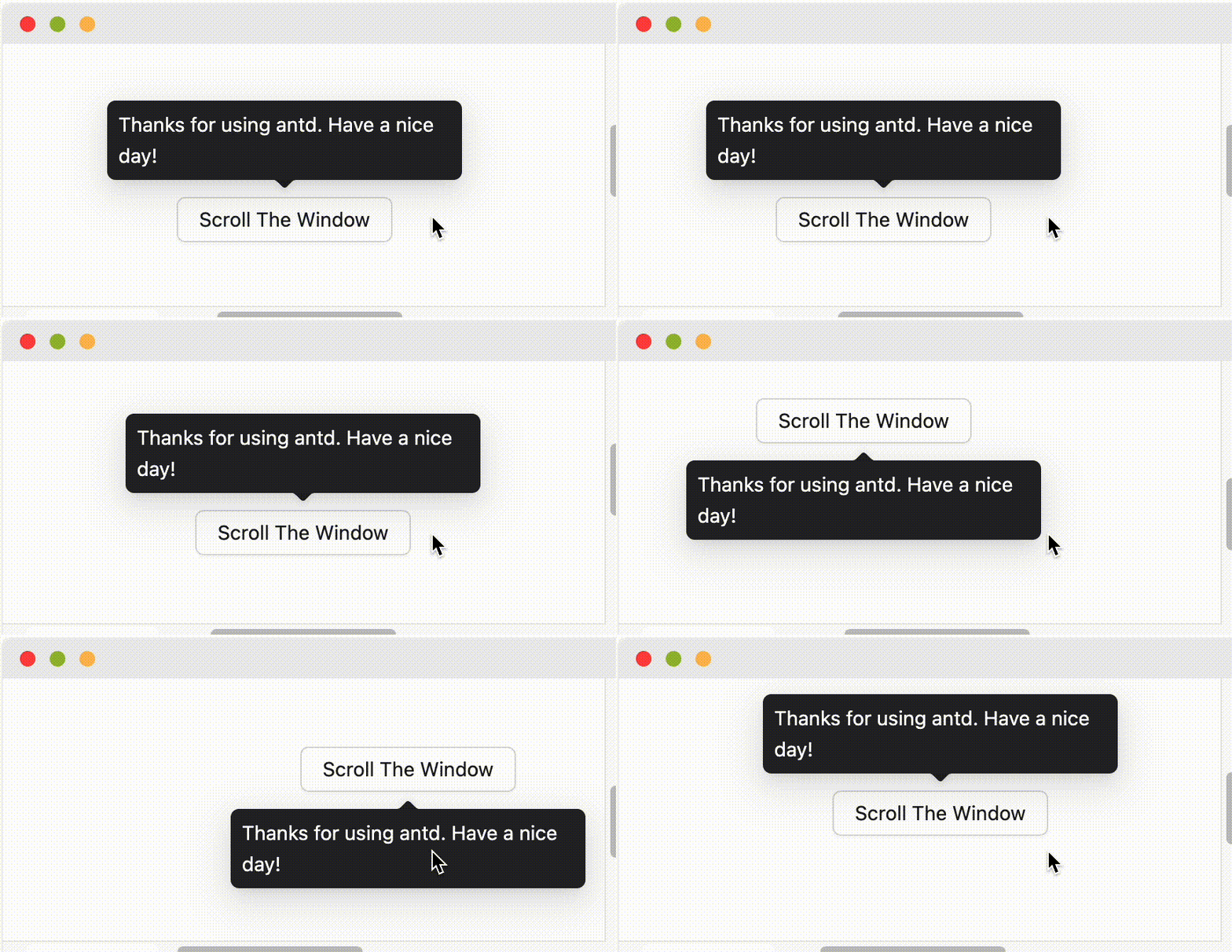
### What's the placement logic?
It will follow `placement` config when screen has enough space. And flip when space is not enough (Such as `top` to `bottom` or `topLeft` to `bottomLeft`). Single direction such as `top` `bottom` `left` `right` will auto shift on the view:
When `placement` is set to edge align such as `topLeft` `bottomRight`, it will only do flip but not do shift.
### How to support keyboard accessibility?
By default, Tooltip and similar components trigger on `hover` rather than `focus`, so they will not respond to keyboard focus events. If you want the component to support keyboard accessibility, you can enable it in the following ways:
- **Enable for a single component**: Set the `trigger` property to include `focus`, for example `trigger="focus"` or `trigger={['hover', 'focus']}`.
- **Enable globally**: Use `ConfigProvider` to set global configuration, so all relevant components across your application support keyboard focus trigger by default.
```jsx
import { ConfigProvider, Tooltip, Button } from 'antd';
// Single component
// Global configuration
```
For more questions, please refer to [Tooltip FAQ](/components/tooltip#faq).
## Shared native props {#jguang-common-props}
> Tips: The following generic properties apply to most antd components; those not supported are described separately.
| Property | Description | Type | Default |
| --- | --- | --- | --- |
| style | The additional style | CSSProperties | - |
| className | The additional css class | string | - |
| rootClassName | ClassName on the root element | string | - |
| autoFocus | Auto focus when component mounted, only effective for focusable elements like forms, links, etc. | boolean | false |
## Install and reproduce an example
```bash
npm install antd@6.6.5 @ant-design/icons@6.3.4 dayjs@1.11.23
```
Use ConfigProvider and native App; configure dayjs locale separately. Each example lists its complete source files and additional pinned dependencies in View code. Example names select demos, not universal component props. See the resource setup guide for theme, locale and SSR.
## Native type references
The source viewer includes unchanged native implementations and the following source declarations. Inherited types remain in their native packages. English source comments are preserved as code reference.
- `vendor/components/popover/PurePanel.tsx`
- `vendor/components/popover/index.tsx`
- `vendor/components/popover/style/index.ts`
## Source and license
https://github.com/ant-design/ant-design/tree/4a39f54842eade4e565ab336ef6097cd7e723cdd
Original bilingual prose and executable examples are retained. Website-only embeds and token tables are expanded locally. Ant Design is MIT; separately listed dependency notices also apply. Upload previews block outbound requests and do not provide a backend.
---
Index of all JGuang resources: https://jiguang132.com/llms.txt
 When `placement` is set to edge align such as `topLeft` `bottomRight`, it will only do flip but not do shift.
### How to support keyboard accessibility?
By default, Tooltip and similar components trigger on `hover` rather than `focus`, so they will not respond to keyboard focus events. If you want the component to support keyboard accessibility, you can enable it in the following ways:
- **Enable for a single component**: Set the `trigger` property to include `focus`, for example `trigger="focus"` or `trigger={['hover', 'focus']}`.
- **Enable globally**: Use `ConfigProvider` to set global configuration, so all relevant components across your application support keyboard focus trigger by default.
```jsx
import { ConfigProvider, Tooltip, Button } from 'antd';
// Single component
When `placement` is set to edge align such as `topLeft` `bottomRight`, it will only do flip but not do shift.
### How to support keyboard accessibility?
By default, Tooltip and similar components trigger on `hover` rather than `focus`, so they will not respond to keyboard focus events. If you want the component to support keyboard accessibility, you can enable it in the following ways:
- **Enable for a single component**: Set the `trigger` property to include `focus`, for example `trigger="focus"` or `trigger={['hover', 'focus']}`.
- **Enable globally**: Use `ConfigProvider` to set global configuration, so all relevant components across your application support keyboard focus trigger by default.
```jsx
import { ConfigProvider, Tooltip, Button } from 'antd';
// Single component